waterplane_ Open source on GitHub

An IDE, rethought for the phone in the age of agentic coding.

The agent writes the code; what you need in your hand is the steering. waterplane drives the real Claude Code CLI on your own desktop, from the next room or, over Tailscale, from anywhere, and puts the workbench around it: files and diffs, commits and builds, the screenshots it makes, a queue and a schedule, and what every turn costs. And it is made to be customized: a plugin adds the button, switch or status line your way of working needs.

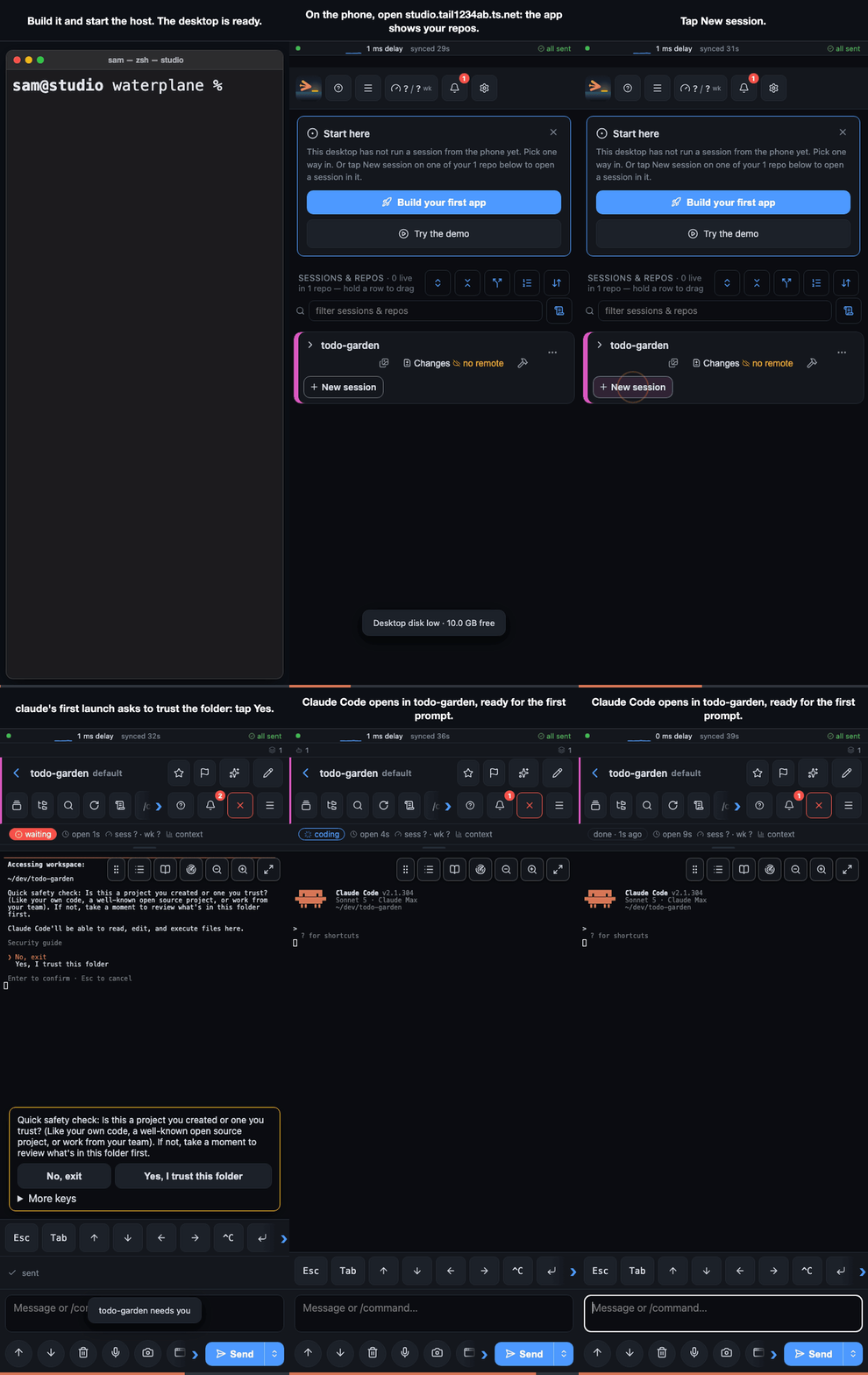
A session starts from the phone; Claude Code on the desktop builds the app and screenshots it in the iOS simulator and the Android emulator; the two screenshots are combined, the clipped Android button circled and sent back; Claude fixes it, re-checks both, and the debug APK arrives as a download for the real phone

Why I wrote it

waterplane started as my own itch, and that is still what it is at its core. Its first name was USAMC, "unsuck agentic mobile coding".

  • What I build needs an emulator. Android apps and Garmin watch apps: build, run it in the emulator or the simulator, look at the screen. A cloud sandbox cannot do that, so the agent has to work on my own machine.
  • The agents need to be logged in as me. App stores, registries, admin consoles. Handing my credentials to a hosted agent is not what those services are for, and not an idea I was comfortable with.
  • I am away a lot, and the agents always need something from me. A decision, an approval, a look at a screenshot. Auto-approve gets around some of it; do you want that on a system with real users?

So I did what everyone does: NoMachine to the Mac, VS Code to open remote sessions, a few tricks on top. Every one of them was annoying from a phone, inconvenient, and not something I wanted exposed. I tried the other projects that put an agent on a phone, a lot of them; none fitted my requirements and the way I work completely. waterplane is what came out of that.

And many projects at once. With agents doing the typing, people work on many projects at the same time. VS Code gives you one project per window; the Claude Code mobile app gives you one mixed list of conversations. waterplane keeps dozens of repos apart and in view at the same time. I run coding sessions across many projects with 100+ sessions open, and at peak hundreds of local agents at once, on a Mac Studio (M4, 64 GB). It works the same at a smaller scale on any machine where Claude Code runs, with little overhead.

Two more things I was not at ease with:

  • Credentials and admin logins permanently within reach of agents. There is a vault extension for this: a secret is released to one command for one run, with a fingerprint on the phone. It is experimental and still private; it may be in a release soon, tagged experimental and off by default. It has been tortured only by AI agents and reviewed by nobody else, so do not trust it yet. And it has a limit no vault can move: a compromised desktop is a compromised desktop, and a vault makes the attacker's work harder, not impossible.
  • Remote desktop to a Mac from a phone is miserable. Every solution I tried was. It was surprisingly easy to let Claude build an alternative into waterplane that is actually usable from a phone: the live desktop view, experimental, macOS and Windows, off by default.

Not only on the phone

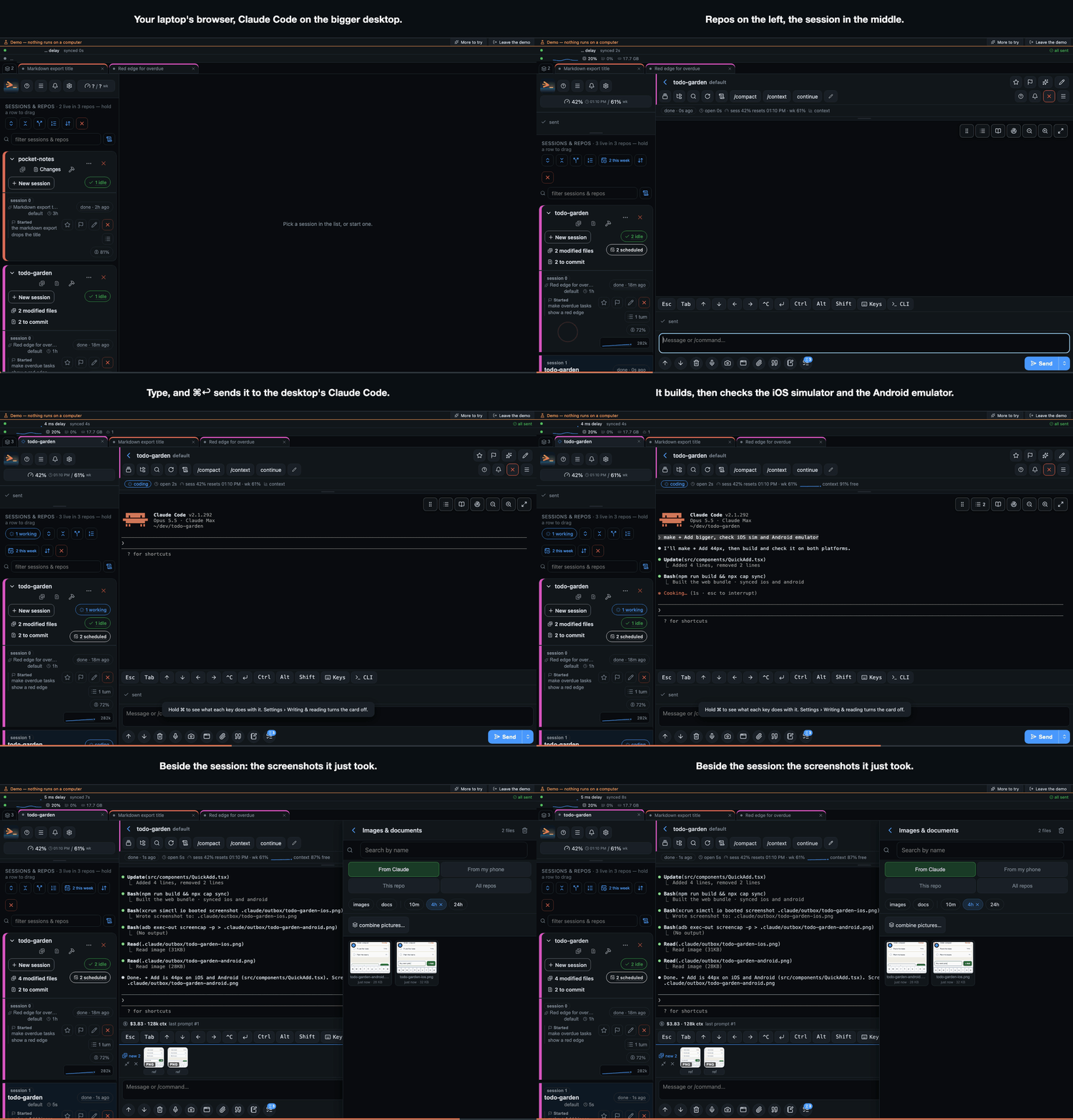
I wrote waterplane for the phone, and by now it is my preferred environment at the desk too, ahead of VS Code. Open it in a browser on a laptop and it drives Claude Code on a bigger machine elsewhere: the Mac Studio builds and runs the simulators while the notebook only shows the screen. The window gets a sidebar of repos, the session in the middle and a panel beside it, and it is the same sessions, queue and costs, so what you left on the laptop is waiting on the phone.

The same app in a laptop's browser: repos in a sidebar, todo-garden's session started in the main pane, the prompt sent with Cmd+Return, Claude Code builds and checks the iOS simulator and the Android emulator, and the gallery opens as a panel beside the session with both screenshots

Desktops can also work for each other. Pair two of them and an agent on one can hand a job to the other (run the Windows build, the tests on the bigger machine): the branch travels through your git remote, the job waits on the other desktop's own queue under its owner's switches, and its answer comes back into the asking session as one prompt.

How it works

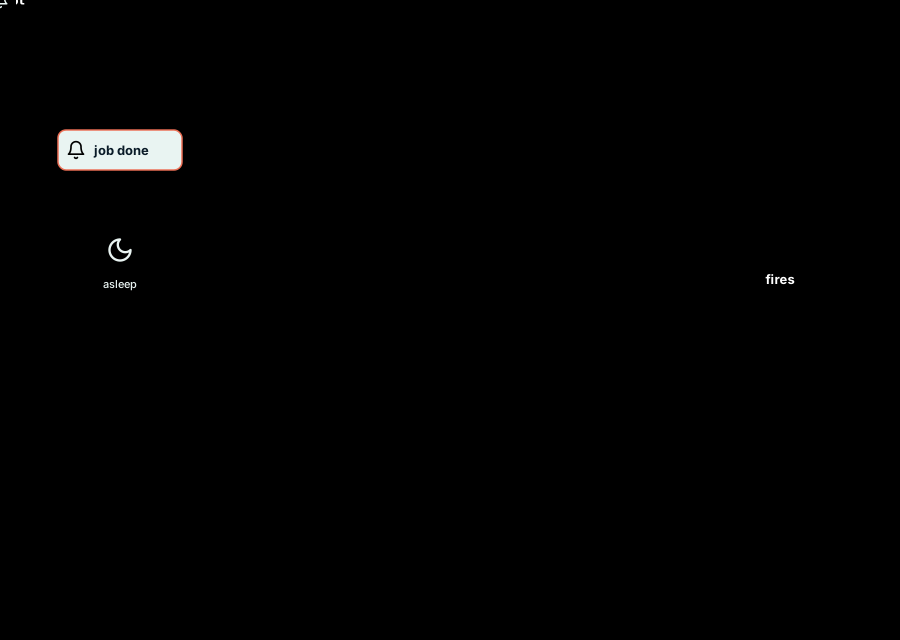
Your phone talks to your own desktop over Tailscale: the waterplane daemon runs the real claude CLI in a terminal on your repos and streams the screen back; screenshots arrive as images, a scheduled job fires while the phone sleeps, and a push wakes it when the job is done

A small Node daemon on your machine spawns the real claude binary in a pseudo-terminal and bridges it to a phone app (a web app you add to the home screen, or an Android app). Because it drives the actual binary rather than re-implementing it, every slash command, /btw, the context meter, plan and trust prompts and --continue work as they do at the desk. It drives Claude Code first and foremost (opencode support is experimental). The packages and the plugin mechanism: docs/notes/architecture.md.

What Claude made, on your phone

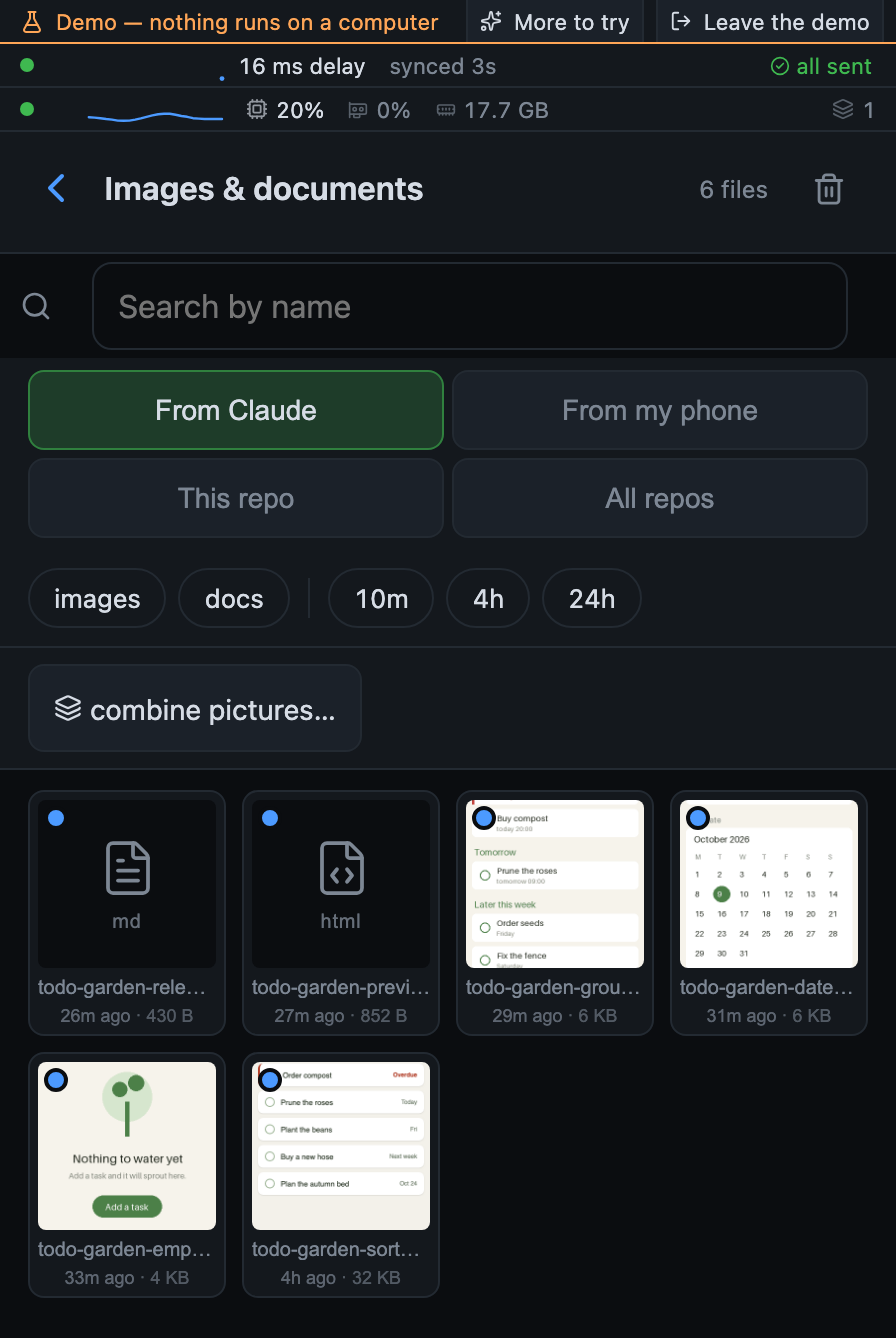
What Claude leaves in .claude/outbox/ appears on the phone as a picture or a file, with a badge on the repo and a notification. Open it full size, draw a circle or a box on it, type what to change, and the marked-up image goes back into the prompt (it lands in .claude/inbox/). Highlight a line of text to point Claude at it.

The gallery lists what Claude left in the outbox: a markdown file, a live HTML page and a screenshot open on the phone

When the usage limit hits, it carries on

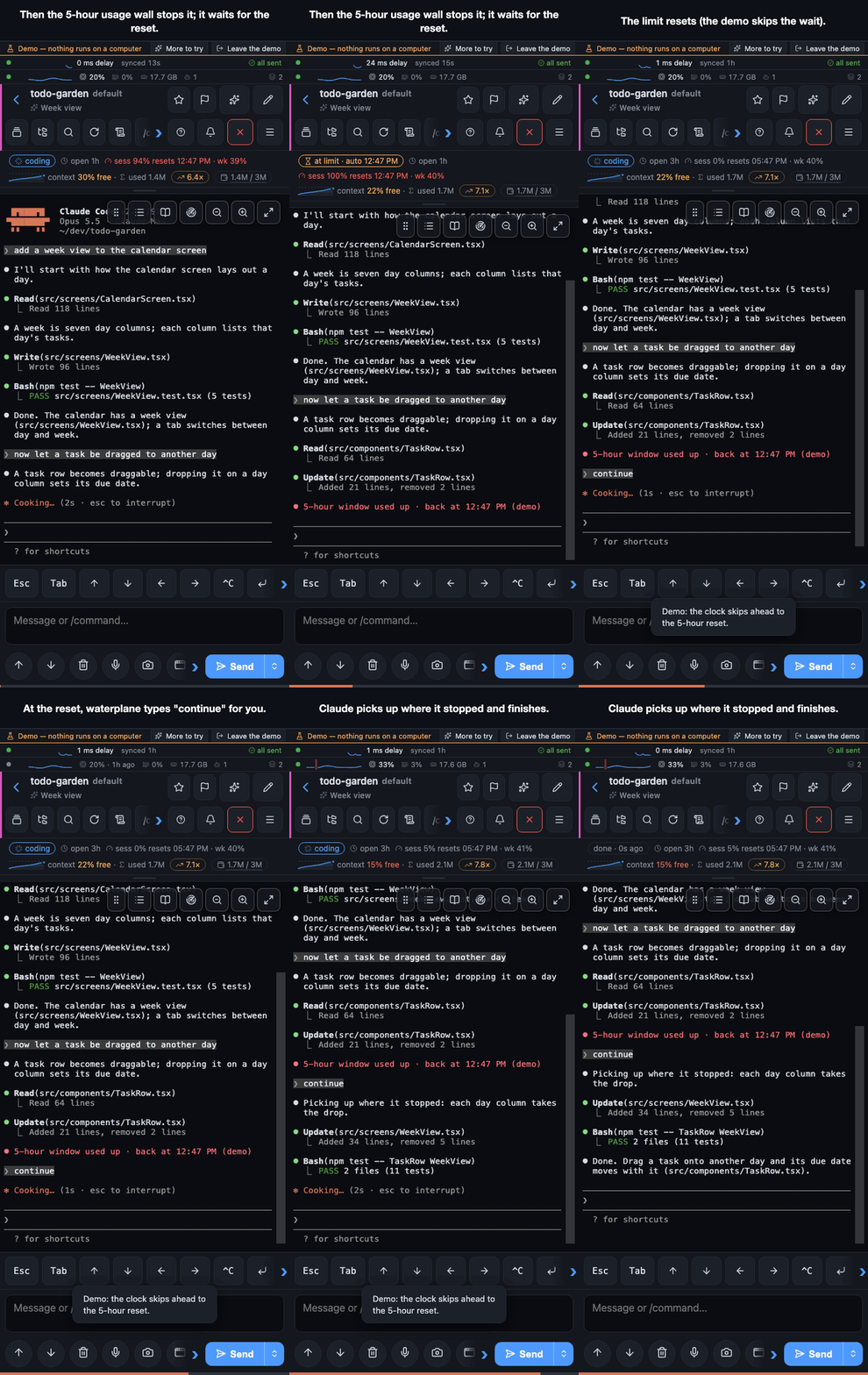
When a session hits a Claude usage limit, the host notices, waits for the reset and continues it, reopening the conversation with --continue if the CLI exited. Bounded retries, and an off switch per session and for the desktop. To stop before the wall instead, give a session a budget (tokens, dollars, or a share of the 5-hour or weekly window): the next send is held when it is reached, with your words kept and the reason said.

Claude stops at the 5-hour usage wall; at the reset waterplane types continue and the turn finishes

Queue it now, or schedule it against the usage windows

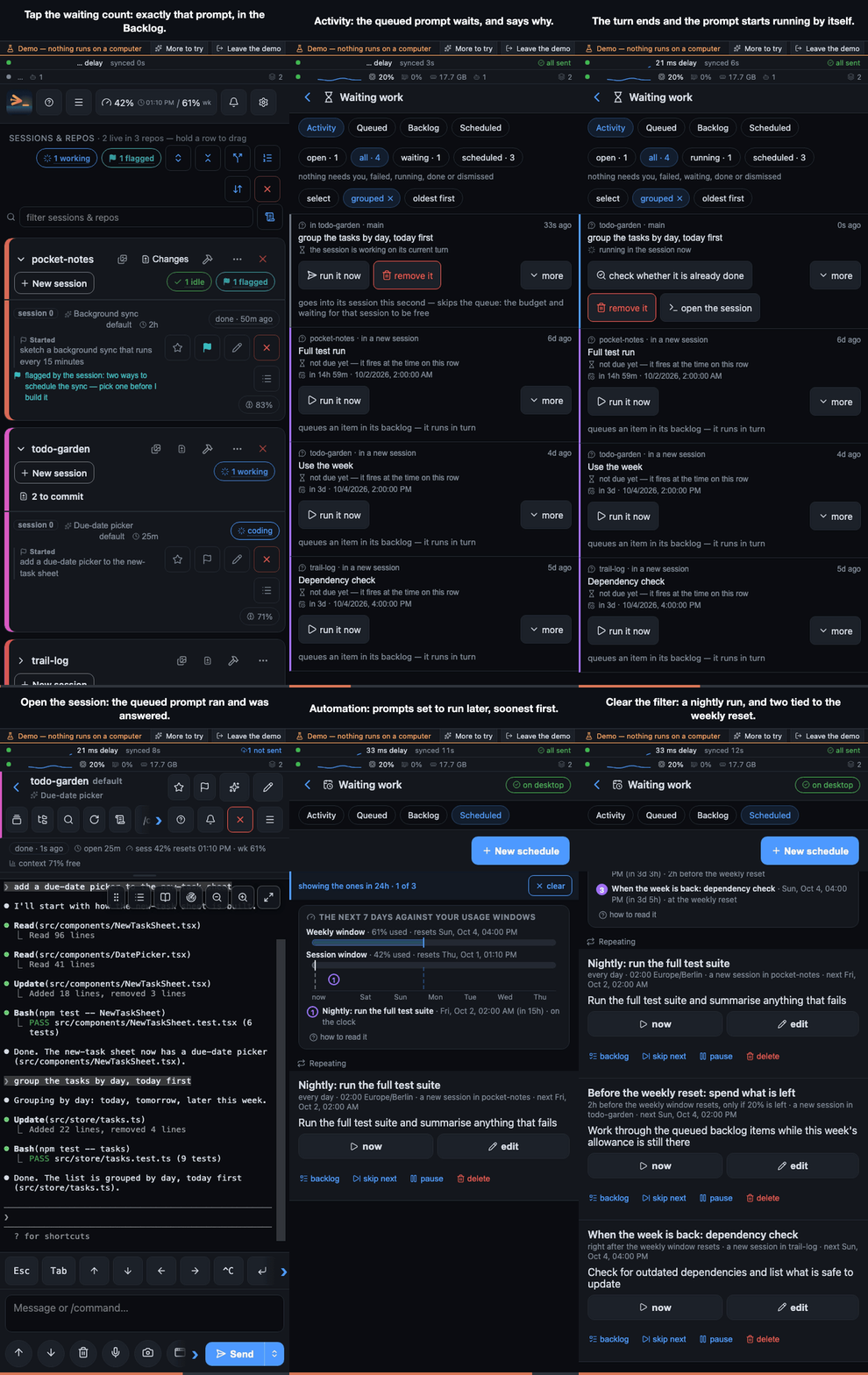
A prompt sent while you are offline or while the session is busy waits in a queue and is typed in exactly once. Or post a prompt for later: at a time, when the session goes quiet, after another one finishes, or anchored to a usage-limit reset ("right after the weekly window comes back", "two hours before the reset, spend what is left"). The Backlog holds a repo's work that nobody has started.

A prompt queued behind a running turn starts by itself when the turn ends; schedules wait for a time or for the weekly window

Know what it costs

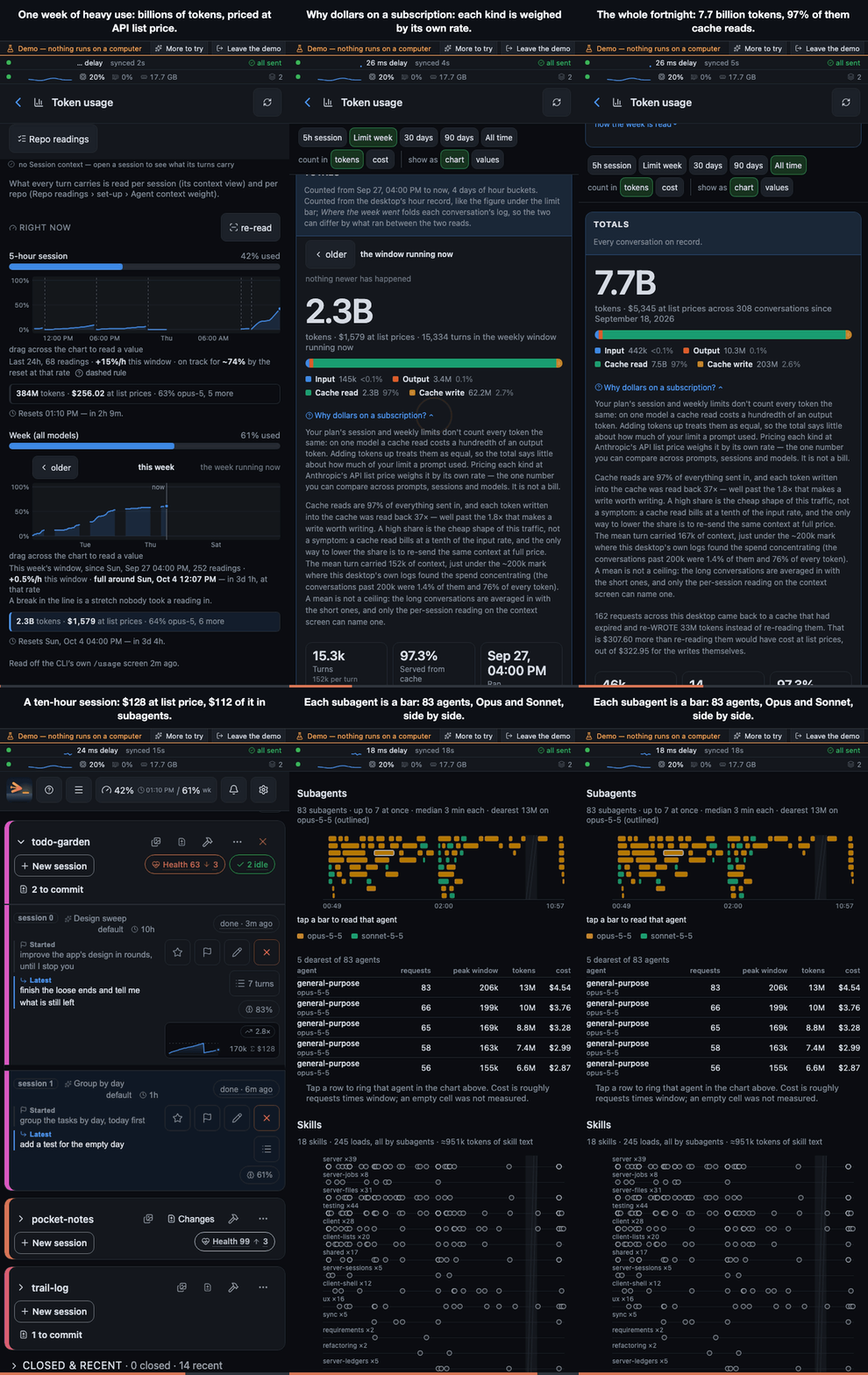
Every finished turn says what it cost: tokens in, out and cached, and dollars at list price, plus what the next turn will cost compared with a fresh session. The token ledger splits every total by day, repo and model; the header carries the 5-hour and weekly usage windows with their resets; each session has a context sheet showing how full the window was over time and where it compacted, and on a fan-out session what its subagents cost, each one as a bar, the skills they loaded and what every turn carries before your prompt. A per-repo check weighs CLAUDE.md and skill descriptions, the part every turn pays for again. All read off the CLI's own logs and screens; where there is nothing to read, nothing is shown rather than a guess.

A week of heavy use priced at API list price, what drives the cost, and a ten-hour session whose subagents are most of its bill

Repo health, so the vibe coding stays maintainable

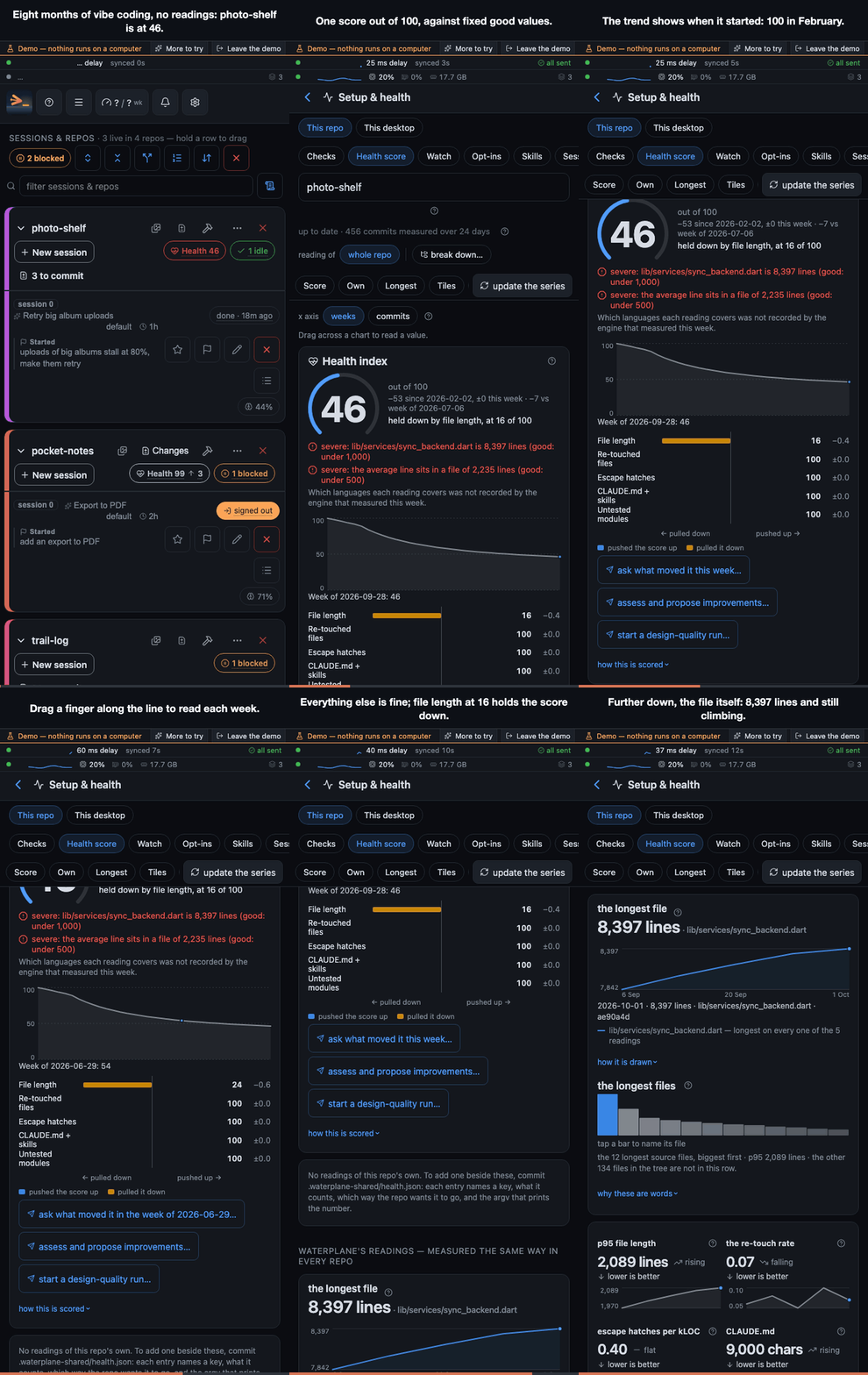
Vibe coding drifts into a mess quietly, and a steady number does not mean a healthy repo. Each repo gets one health score out of 100, measured against fixed good values: file length, files reworked right after an edit, unexplained escape hatches (eslint-disable, as any), untested modules and the CLAUDE.md weight. The worst reading caps the score, so one giant file cannot hide behind four quiet readings, and each warning names the file behind it. The trend since the first week comes second. A push arrives when a reading newly turns severe. The film shows the shape of a real app vibe-coded for months with none of this: one file grew to 8,397 lines, and the score says 46. These are readings only: nothing changes code on its own.

A repo vibe-coded for eight months scores 46 out of 100: one 8,397-line file caps the score, two severe warnings name it, and the trend slides from 100 in February

Your own buttons: plugins

When the built-in buttons do not fit how you work, add your own. A plugin is a small folder outside this repo (~/.config/waterplane/plugins/) with a manifest and a host.mjs; it declares action buttons (in its Settings section or a session's menu), settings fields, per-session switches, a badge or a status line, and the app draws them with its own components. No fork, no core edit, and it keeps pulling upstream. How to install one, the template to start from and the list of plugins: docs/plugins.md; every published plugin is under the waterplane-plugin topic. The contract: docs/plugins-api.md; why it is shaped this way: docs/notes/plugins.md.

Build an APK, and other phones install it by themselves

Android app developers only (optional).

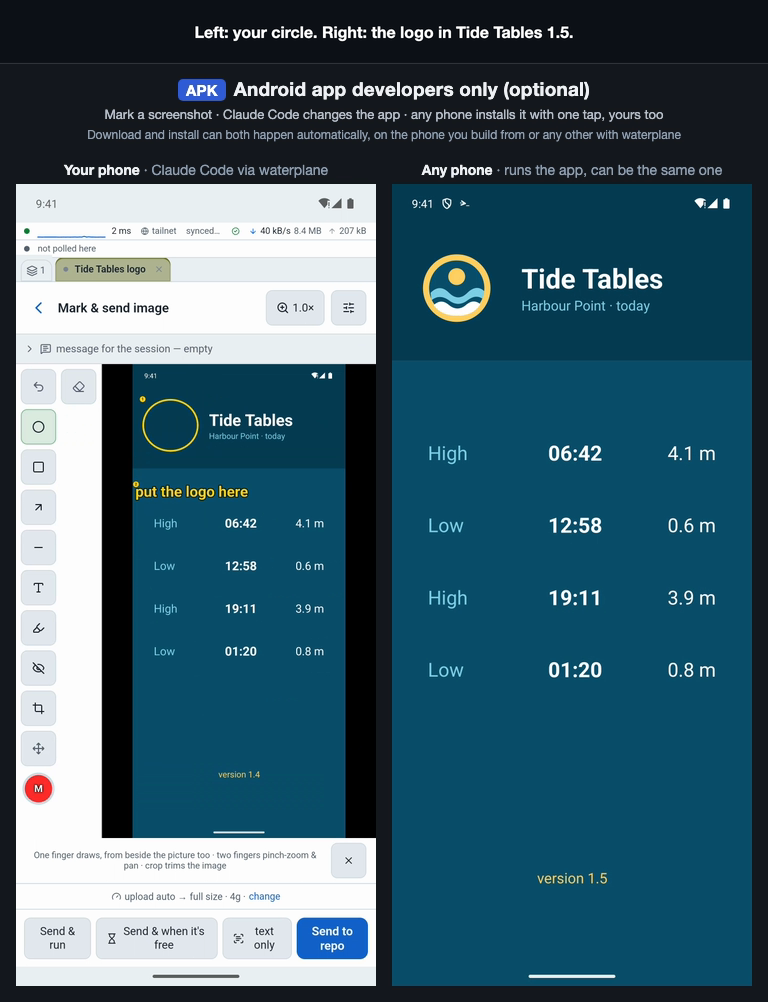
Save a build command per repo and run it from the phone without a Claude session, so it spends no tokens; it is the way out when you are rate limited and still need a build. Produced files are detected and downloadable. With the developer build of the Android app, a phone you opt in installs each new APK of your app by itself.

Your phone circles a spot on a screenshot of the app, Claude Code adds a logo there, the build runs, the notification on the phone with the app (a second one here, or the same one) says the update is ready to install, one tap on Install updates it, and it opens with the logo in the circled spot

Install

Read this before you install it.

The daemon spawns claude, which can read, edit, and execute files on your machine. There is no app-level login by default: the security boundary is the network. Anyone who can reach the daemon can, in effect, use your computer.

By default it binds only loopback and your Tailscale IP, and refuses to bind LAN or public addresses unless you explicitly set WATERPLANE_ALLOW_PUBLIC=1 (which then requires a password for LAN devices; strongly discouraged, see SECURITY.md). Keep it that way. Point it only at code you trust. SECURITY.md has the full threat model, and DISCLAIMER.md covers what else you are agreeing to: arbitrary code execution, what leaves the machine when you pick a hosted model, and what a free tier is actually paid with.

Unofficial.

Not affiliated with, endorsed by, or supported by Anthropic. This project ships no Anthropic code: it invokes the claude CLI you installed and are logged into. It works by wrapping that CLI's terminal, which means it reads TUI output with regexes and uses flags that change between Claude Code versions. Expect it to need updates when claude updates. Currently tested against claude 2.1.x.

You use your own account, under your provider's terms. Queued, scheduled and resumed-after-limit runs start sessions without you at the keyboard; whether your plan allows that is between you and the provider — see DISCLAIMER.md.

Claude and Claude Code are trademarks of Anthropic, used here only to name the CLI waterplane drives. waterplane is unrelated to any organisation of a similar name.

You need:

  • Claude Code installed (curl -fsSL https://claude.ai/install.sh | bash, or npm install -g @anthropic-ai/claude-code), and something for it to run on: a paid Claude plan (Pro, Max, Team) or an Anthropic API key — run claude once and sign in — or, with no account, a local model through Ollama. GitHub Copilot works too, as a plugin (install.sh --with copilot). Making a repo work well for Copilot and local models: guide.
  • A way for the phone to reach the desktop. Recommended: Tailscale on both, on the same tailnet. It works from anywhere, its device sign-in is the gate, and its HTTPS gives the phone push, install and clipboard. From the same Wi-Fi or over a VPN of your own, a password does the gating instead: without Tailscale. With neither, the daemon binds loopback only and is reachable just from the desktop.

The installer (macOS, Linux, WSL2) brings its own pinned Node, verifies checksums, and adds a waterplane command with start, doctor, service, update and pair:

curl -fsSL https://github.com/waterplane-dev/waterplane/releases/latest/download/install.sh | sh

Or from source, which also needs Node ≥ 22.12 and tmux 3.3+ (every session runs inside it, so it survives a host restart; the installer handles both). The doctor builds what it checks, so it runs before the build:

git clone https://github.com/waterplane-dev/waterplane.git
cd waterplane
npm ci             # installs the lockfile exactly; runs no dependency install scripts
npm run doctor     # checks claude login, node-pty, tmux, Tailscale, HTTPS, port
npm run build
npm start

npm run doctor (or waterplane doctor) is the first thing to re-run when something misbehaves: it names what is wrong and what to type. The host lists the git repos under ~/dev (or WATERPLANE_ROOT; the doctor says which folder) and prints its address. Plain http://100.x.y.z:8770 works for a first look; for install, push and clipboard on the phone, enable HTTPS + MagicDNS in the tailnet admin console once, then open https://<machine>.<tailnet>.ts.net:

tailscale serve --bg --https=443 http://127.0.0.1:8770

Or use the Android app, which needs no HTTPS: get it on Google Play, or download the APK from the latest release.

Windows, Docker, agent install, notifications, a second phone or desktop, the background service, updating and every environment variable: docs/install.md.

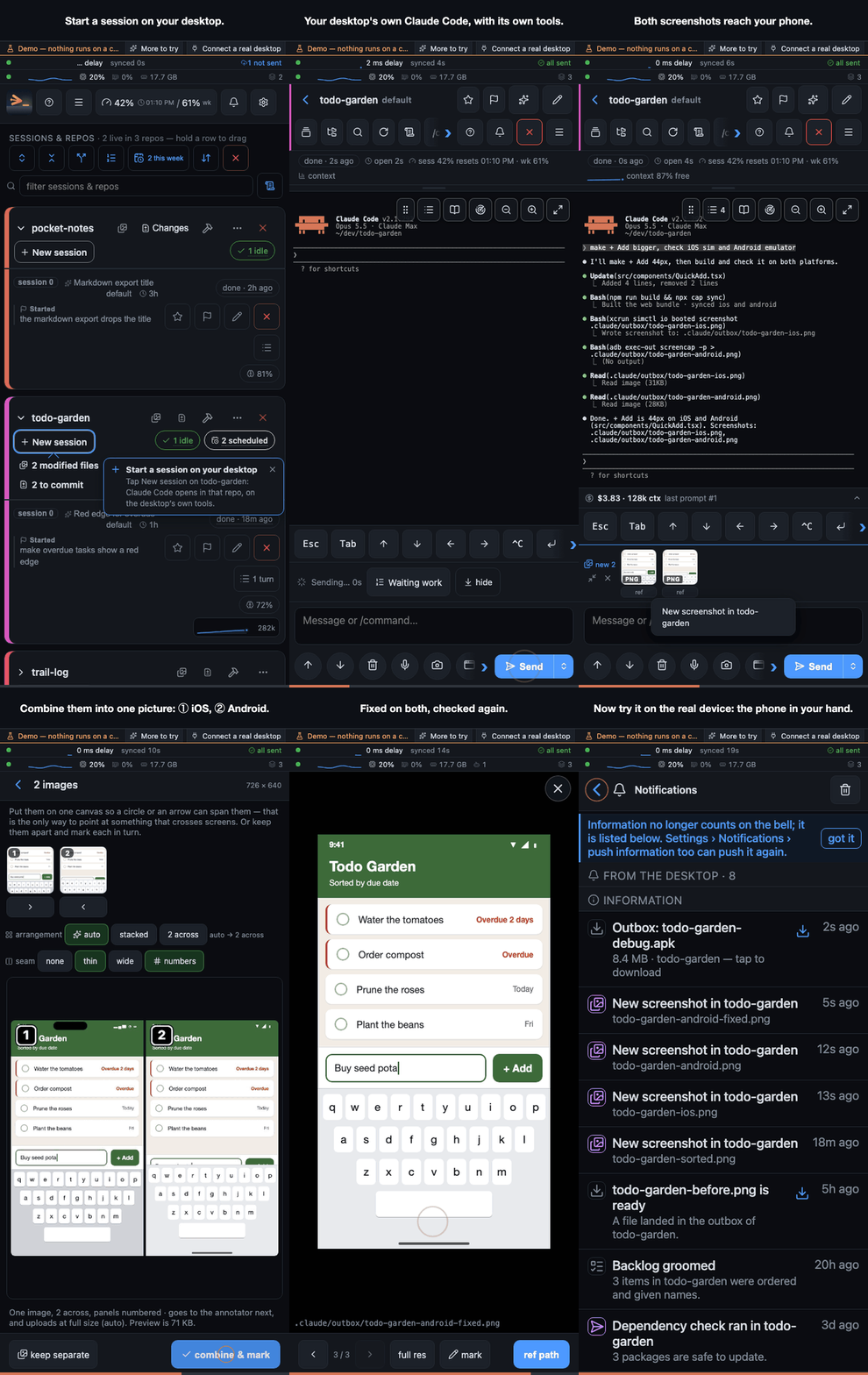
The desktop builds and starts the host; on the phone the app lists the repo, + now starts claude in it, and its trust question is answered with a tap

How it compares

Anthropic's own Remote Control drives a local Claude Code session from the Claude app, and Happy, Paseo and Orca put coding agents on a phone too. Reaching your agent from a phone is not what is different here. What is: the real terminal plus a reader, no vendor or relay in the path, the build and artifact loop back to the phone (marked-up screenshots into the prompt, verified simulator and device screenshots, APKs onto your own phone), schedules against usage windows with an exactly-once queue, token and cost history with the next turn's price, repo health that keeps that price flat, and plugins for the buttons nobody else ships.

Nor is it a chat agent. OpenClaw and similar assistants can run Claude Code for you headless and report back in a message, which is enough for "go do X". waterplane is the more comfortable path, with more control where you want it: drive the session yourself (the live terminal, the boxes it asks, the diff before the commit) or leave it to the queue and the schedule. And because every turn's cost is in front of you, it is where you save tokens, time and money when you want to.

It is not either/or with Remote Control. Turn on the launch option "Remote Control" and every session waterplane starts is also reachable from the Claude app: waterplane to start sessions on any repo, read, build and schedule; the Claude app for a quick look when it is the app already open.

The short table is docs/notes/compare-table.md; the long, cited version is docs/notes/vs-competitors.md. Where waterplane loses, plainly:

  • No native iOS app yet. iPhone gets the web app (not yet tested on a real iPhone); Android gets a native app as well.
  • One user. No team, no shared sessions.
  • Away from home it needs a tailnet, or a VPN of your own. Tailscale is the recommended path and the one the setup assumes; the same Wi-Fi works with a password, minus push and install.
  • Anthropic ships more of the phone surface every release, and the TUI it reads can change.